
Analyzing Wavefunctions#
This tutorial demonstrates how to extract and analyze wavefunction data from trained JaQMC models. You’ll learn how to:
Load checkpoints to retrieve trained parameters and walker configurations
Evaluate wavefunctions on the loaded data
Compute physical observables like kinetic and potential energy
Compute custom observables from walker configurations
Evaluate on custom configurations to visualize the wavefunction
Prerequisites: This tutorial assumes familiarity with running JaQMC computations. See Training Statistics for basics.
Extra Packages
This tutorial uses matplotlib for plotting.
If you’re working from a JaQMC repository clone:
uv sync --group analysis
If you’re using JaQMC in your own environment:
pip install pandas h5py matplotlib
We’ll use a simple hydrogen atom as our example system.
Setup#
First, let’s import the necessary modules. We’ll need:
JAX/JAX NumPy for array operations and automatic differentiation
JaQMC modules for wavefunctions, estimators, and checkpoint management
import dataclasses
import shutil
from pathlib import Path

import jax
import matplotlib.pyplot as plt
from jax import numpy as jnp

from jaqmc.app.molecule import MoleculeTrainWorkflow
from jaqmc.app.molecule.hamiltonian import potential_energy
from jaqmc.estimator import EstimatorPipeline
from jaqmc.estimator.kinetic import EuclideanKinetic
from jaqmc.utils import parallel_jax
from jaqmc.utils.config import ConfigManager
We’ll use a temporary directory for this tutorial. Any previous runs in the notebook’s execution directory will be cleaned up automatically.
WORKING_DIR = Path("runs/jaqmc_tutorial_wf")

if WORKING_DIR.exists():
    shutil.rmtree(WORKING_DIR)
WORKING_DIR.mkdir(parents=True)
1. Running a Computation#
First, let’s run a short VMC training to generate checkpoints we can load. If you prefer the CLI, the equivalent command would look like:
jaqmc molecule train --yml tutorial-train.yml
Here, tutorial-train.yml stands for a YAML config with the same settings as the Python ConfigManager(...) configuration shown below. In this notebook we use the Python API so the training run and the later analysis stay in one executable document.
cfg = ConfigManager(
    {
        "system": {
            "atoms": [{"symbol": "H", "coords": [0.0, 0.0, 0.0]}],
            "electron_spins": [1, 0],
        },
        "workflow": {"batch_size": 256, "save_path": str(WORKING_DIR)},
        "wf": {"hidden_dims_single": [64, 64], "hidden_dims_double": [16, 16]},
        "pretrain": {"run": {"iterations": 100}},
        "train": {"run": {"iterations": 100}},
    }
)

workflow = MoleculeTrainWorkflow(cfg)
workflow()  # Run the workflow
2. Loading Checkpoints#
Checkpoints store the wavefunction parameters and walker configurations. The easiest way to restore a checkpoint is through the workflow’s training stage, which automatically handles wavefunction architecture and data templates:
# Restore checkpoint through the training stage
state = workflow.restore_checkpoint(WORKING_DIR)

# Access the wavefunction from the stage
wf = workflow.train_stage.wavefunction
WARNING:jaqmc.wavefunction.output.envelope:orbitals_spin_split=True ignored: one spin channel is empty (nspins=(1, 0)). Using shared envelope parameters.
The restored state contains the trained neural network parameters and the final walker configurations from training:
params = state.params
batched_data = state.batched_data

print("Loaded state contents:")
print(f"  - params: {type(params).__name__} with {sum(p.size for p in jax.tree.leaves(params)):,} parameters")
print(f"  - batched_data: {batched_data.batch_size} walkers")
print(f"  - electron positions shape: {batched_data.data.electrons.shape}")
Loaded state contents:
  - params: dict with 11,248 parameters
  - batched_data: 256 walkers
  - electron positions shape: (256, 1, 3)
3. Evaluating the Wavefunction#
With the loaded parameters and walker configurations, we can evaluate the wavefunction. The apply method returns a dictionary containing:
logpsi: The log of the wavefunction amplitudesign_logpsi: The sign of the wavefunction (±1)abs_logdets,sign_logdets: Determinant information for multi-electron systems
We use jax.vmap to evaluate over all walkers, wrapped in jit_sharded so it works on both single-device and multi-GPU setups (see Section 4 for a detailed explanation of shard_map and partition specs):
P = jax.sharding.PartitionSpec

evaluate_wf = parallel_jax.jit_sharded(
    lambda p, bd: jax.vmap(wf.apply, in_axes=(None, bd.vmap_axis))(p, bd.data),
    in_specs=(P(), batched_data.partition_spec),
    out_specs=parallel_jax.DATA_PARTITION,
)
wf_output = evaluate_wf(params, batched_data)

print("Wavefunction output keys:", list(wf_output.keys()))
print(f"\nlog(ψ) shape: {wf_output['logpsi'].shape}")
print(f"log(ψ) statistics:")
print(f"  mean: {jnp.mean(wf_output['logpsi']):.4f}")
print(f"  std:  {jnp.std(wf_output['logpsi']):.4f}")
Wavefunction output keys: ['abs_logdets', 'logpsi', 'sign_logdets', 'sign_logpsi']

log(ψ) shape: (256,)
log(ψ) statistics:
  mean: 0.8772
std: 0.8670
# Extract a single walker by indexing dim 0 of each batched field
single_data = dataclasses.replace(
    batched_data.data,
    **{k: batched_data.data[k][0] for k in batched_data.fields_with_batch},
)
single_output = wf.apply(params, single_data)

print("Single walker evaluation:")
print(f"  log(ψ) = {single_output['logpsi']:.6f}")
print(f"  sign  = {single_output['sign_logpsi']:.0f}")
print(f"  electron position: {single_data.electrons}")
Single walker evaluation:
  log(ψ) = 0.239867
  sign  = 1
  electron position: [[ 2.0321143   0.5126239  -0.02912986]]
4. Computing Physical Observables#
JaQMC provides built-in estimators for computing physical observables. Each estimator implements evaluate_local for a single walker, and evaluate_batch automatically vmaps it over the batch of walkers.
We’ll use the built-in EuclideanKinetic estimator and the potential_energy function. EstimatorPipeline accepts both Estimator subclass instances and plain functions with the estimator signature:
kinetic_est = EuclideanKinetic(f_log_psi=wf.logpsi, data_field="electrons")

estimators = {
    "kinetic": kinetic_est,
    "potential": potential_energy,
}

pipeline = EstimatorPipeline(estimators)
estimator_state = pipeline.init(batched_data, jax.random.PRNGKey(0))
Using shard_map for device-parallel evaluation#
Internally, evaluate_batch uses jax.vmap to map evaluate_local over all walkers. However, the restored checkpoint data carries named sharding metadata (e.g. qmc_batch_axis) from training, while freshly created arrays like random keys do not. Mixing these inside a single vmap triggers a JAX error about inconsistent axis specs.
The solution is the same one the training loop uses: wrap the call in jit_sharded, which combines jax.jit with shard_map. Inside a shard_map, each device only sees its own local shard — plain arrays with no global sharding metadata — so the vmap inside evaluate_batch works without conflict.
This approach works on both single-device (CPU, single GPU) and multi-device (multi-GPU) setups. On a single device the mesh is trivial (one shard = the whole array), so there is no overhead.
Choosing partition specs. Each input and output needs a PartitionSpec describing how it maps onto the device mesh:
Argument |
Spec |
Rationale |
|---|---|---|
|
|
All devices need the full set of wavefunction parameters. |
|
|
Walkers are sharded across devices along the batch dimension ( |
|
|
Both estimators here have |
|
|
Each device receives the same random key. Deterministic splitting inside the pipeline gives each walker a unique sub-key. |
output |
|
Scalars after per-walker mean + cross-device |
output |
|
Still |
P = jax.sharding.PartitionSpec

evaluate = parallel_jax.jit_sharded(
    pipeline.evaluate,
    in_specs=(
        P(),                          # params: replicated
        batched_data.partition_spec,  # batched_data: batch dim sharded
        P(),                          # estimator_state: no array leaves
        P(),                          # rngs: replicated
    ),
    out_specs=(
        P(),                          # step_stats: reduced scalars
        P(),                          # estimator_state: no array leaves
    ),
)

mean_stats, estimator_state = evaluate(
    params, batched_data, estimator_state, jax.random.PRNGKey(1)
)

# finalize_stats() expects a leading step dimension — add one for single-step use
batched_mean_stats = jax.tree.map(lambda x: x[None], mean_stats)
final_stats = pipeline.finalize_stats(batched_mean_stats, estimator_state)

print(f"Computed observables (from {batched_data.batch_size} walkers):")
print(f"  Kinetic energy:   {final_stats['energy:kinetic']:.6f} Ha")
print(f"  Potential energy: {final_stats['energy:potential']:.6f} Ha")
total_energy = final_stats['energy:kinetic'] + final_stats['energy:potential']
print(f"  Total energy:     {total_energy:.6f} Ha")
print(f"\n  (Exact H atom: -0.5 Ha)")
Computed observables (from 256 walkers):
  Kinetic energy:   0.502281 Ha
  Potential energy: -0.996064 Ha
  Total energy:     -0.493784 Ha

  (Exact H atom: -0.5 Ha)
The energy variance is a measure of wavefunction quality - lower variance indicates a better ansatz:
print("Energy variance (from estimator pipeline):")
print(f"  Kinetic var:   {final_stats['energy:kinetic_var']:.6f}")
print(f"  Potential var: {final_stats['energy:potential_var']:.6f}")
Energy variance (from estimator pipeline):
  Kinetic var:   0.543528
  Potential var: 0.554971
Visualizing Local Energy#
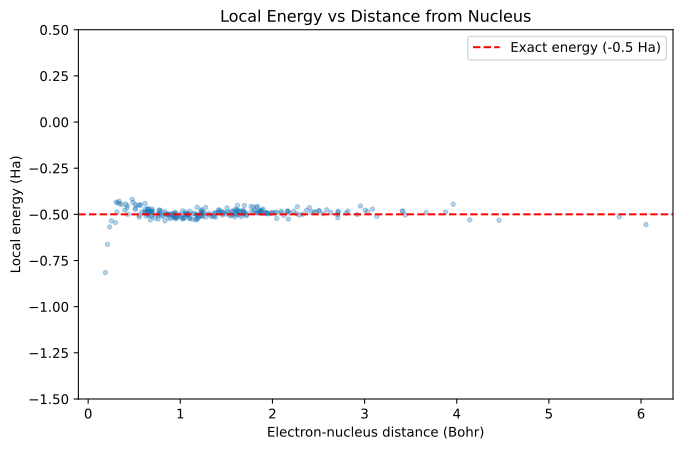
The local energy \(E_L(r) = H\psi(r)/\psi(r)\) should be constant everywhere for an exact eigenstate. Plotting it against electron-nucleus distance reveals how well the wavefunction performs at different regions.
We use the same jit_sharded pattern to vmap evaluate_local over walkers:
def compute_local_energy(params, data):
    kinetic_stats, _ = kinetic_est.evaluate_local(params, data, {}, None, jax.random.PRNGKey(0))
    potential_stats, _ = potential_energy(params, data, {}, None, jax.random.PRNGKey(0))
    return kinetic_stats["energy:kinetic"] + potential_stats["energy:potential"]

compute_local_energies = parallel_jax.jit_sharded(
    lambda p, bd: jax.vmap(
        lambda d: compute_local_energy(p, d),
        in_axes=(bd.vmap_axis,),
    )(bd.data),
    in_specs=(P(), batched_data.partition_spec),
    out_specs=parallel_jax.DATA_PARTITION,
)
local_energies = compute_local_energies(params, batched_data)

# Electron-nucleus distance for each walker
r_en = jnp.linalg.norm(batched_data.data.electrons[:, 0, :] - batched_data.data.atoms[0, :], axis=-1)

fig, ax = plt.subplots(figsize=(8, 5))
ax.scatter(r_en, local_energies, alpha=0.3, s=10)
ax.axhline(y=-0.5, color="r", linestyle="--", label="Exact energy (-0.5 Ha)")
ax.set_xlabel("Electron-nucleus distance (Bohr)")
ax.set_ylabel("Local energy (Ha)")
ax.set_title("Local Energy vs Distance from Nucleus")
ax.legend()
ax.set_ylim(-1.5, 0.5)
plt.show()
5. Computing Custom Observables#
You can compute any observable from the walker configurations. The batched_data.data object contains electron and atom positions that can be used for custom calculations.
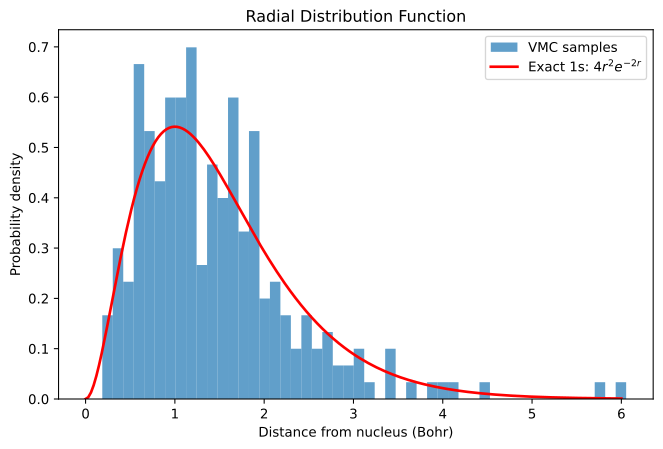
Let’s analyze the electron-nucleus distance distribution (we already computed r_en in Section 4):
print(f"Electron-nucleus distance statistics ({len(r_en)} walkers):")
print(f"  Mean:   {jnp.mean(r_en):.4f} Bohr")
print(f"  Std:    {jnp.std(r_en):.4f} Bohr")
print(f"  Min:    {jnp.min(r_en):.4f} Bohr")
print(f"  Max:    {jnp.max(r_en):.4f} Bohr")
print(f"\n  (1 Bohr ≈ 0.529 Å)")
Electron-nucleus distance statistics (256 walkers):
  Mean:   1.4541 Bohr
  Std:    0.8761 Bohr
  Min:    0.1872 Bohr
  Max:    6.0538 Bohr

  (1 Bohr ≈ 0.529 Å)
Compare the sampled radial distribution with the exact hydrogen 1s orbital \(P(r) = 4r^2 e^{-2r}\):
fig, ax = plt.subplots(figsize=(8, 5))

ax.hist(r_en, bins=50, density=True, alpha=0.7, label="VMC samples")

# Exact hydrogen 1s radial distribution
r_exact = jnp.linspace(0, 6, 200)
p_exact = 4 * r_exact**2 * jnp.exp(-2 * r_exact)
ax.plot(r_exact, p_exact, "r-", lw=2, label="Exact 1s: $4r^2 e^{-2r}$")

ax.set_xlabel("Distance from nucleus (Bohr)")
ax.set_ylabel("Probability density")
ax.set_title("Radial Distribution Function")
ax.legend()
plt.show()
6. Evaluating on Custom Configurations#
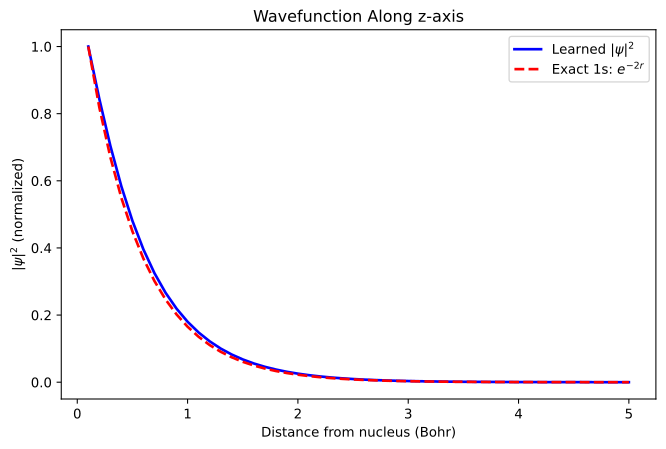
You can evaluate the wavefunction on arbitrary electron configurations by creating custom data objects. This is useful for visualizing the wavefunction shape.
We start from a single-walker template extracted from the batch — this preserves the correct atom positions and charges — and replace the electrons field with our custom positions. Since these are small arrays evaluated identically on every device, all inputs and outputs use P() (replicated):
Let’s evaluate \(|\psi|^2\) along the z-axis from the nucleus:
z_values = jnp.linspace(0.1, 5.0, 50)

# Place electrons along z-axis: (x=0, y=0, z=distance)
custom_positions = jnp.stack([
    jnp.zeros_like(z_values),
    jnp.zeros_like(z_values),
    z_values
], axis=-1)[:, None, :]  # Shape: (50, 1, 3)

# Build a template with correct field values (atoms at origin, etc.)
# by extracting a single walker from the batch.
template = dataclasses.replace(
    batched_data.data,
    **{k: batched_data.data[k][0] for k in batched_data.fields_with_batch},
)

eval_logpsi = parallel_jax.jit_sharded(
    lambda p, t, positions: jax.vmap(
        lambda e: wf.logpsi(p, t.merge({"electrons": e}))
    )(positions),
    in_specs=(P(), P(), P()),
    out_specs=P(),
)
log_psi_values = eval_logpsi(params, template, custom_positions)

# Plot |ψ|² along z-axis
fig, ax = plt.subplots(figsize=(8, 5))

psi_squared = jnp.exp(2 * log_psi_values)
psi_squared_normalized = psi_squared / jnp.max(psi_squared)
ax.plot(z_values, psi_squared_normalized, "b-", lw=2, label="Learned $|\\psi|^2$")

# Exact 1s orbital: |ψ|² ∝ e^(-2r)
exact_psi_squared = jnp.exp(-2 * z_values)
exact_normalized = exact_psi_squared / jnp.max(exact_psi_squared)
ax.plot(z_values, exact_normalized, "r--", lw=2, label="Exact 1s: $e^{-2r}$")

ax.set_xlabel("Distance from nucleus (Bohr)")
ax.set_ylabel("$|\\psi|^2$ (normalized)")
ax.set_title("Wavefunction Along z-axis")
ax.legend()
plt.show()
Summary#
In this tutorial, we learned how to:
Load checkpoints using
workflow.restore_checkpoint()to restore trained parameters and walker statesEvaluate wavefunctions using
wf.apply()to get log-amplitudes and signsCompute physical observables like kinetic and potential energy using the
EstimatorPipelineCompute custom observables from the walker ensemble (e.g., radial distribution)
Evaluate on custom configurations to visualize the wavefunction shape
This enables post-processing analysis of trained wavefunctions, computing additional observables not tracked during training, and visualizing the learned wavefunction.
For basic training statistics and plotting, see Training Statistics.